ViralSplice vs CapCut: Features Comparison for Short-Form Video Creators
CapCut and ViralSplice both turn video into Shorts, but they start from opposite ends of the job. CapCut is a full video editor: a timeline, templates, effects and AI tools for building any video you can imagine. ViralSplice does exactly one thing: it takes a long video or a YouTube link, finds the best moments, cuts them into vertical 9:16 clips and adds captions. If you already know what you want to make, CapCut gives you the workshop. If you want finished Shorts from a long recording with almost no editing, ViralSplice gives you the shortcut.
What each tool is built to do
CapCut is a general-purpose editor for desktop, web and mobile. You trim clips on a timeline, add text, stickers, transitions, music and effects, and export in any aspect ratio. Its AI side covers auto captions, background removal, text-to-speech and, on paid plans, AI video generation with Seedance, which can generate clips from a text prompt. It is a tool for creators who enjoy the editing process itself.
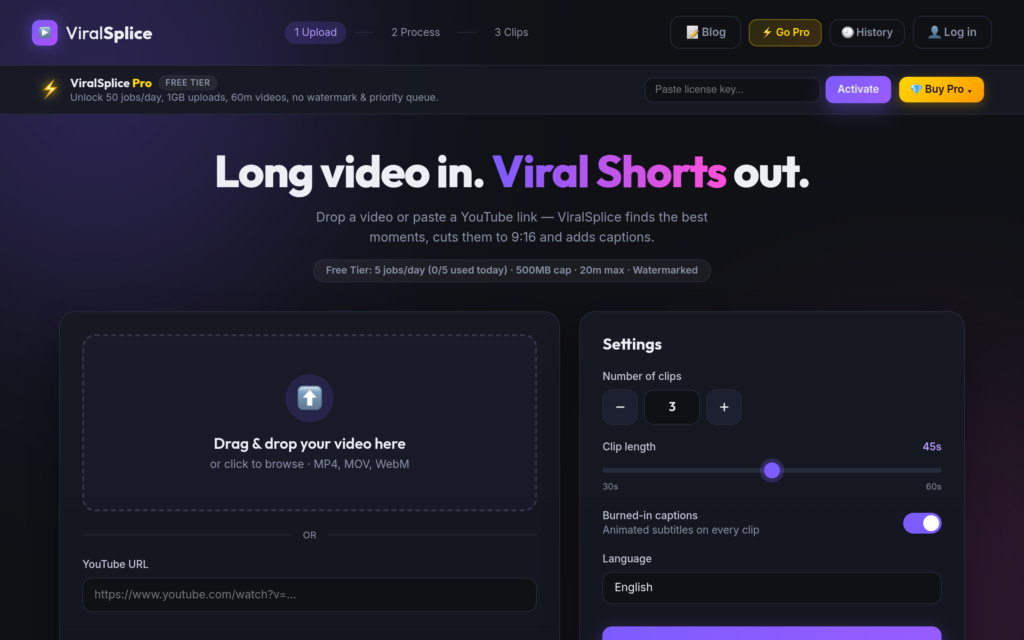
ViralSplice is a single-purpose pipeline. Paste a public YouTube link or upload a video file, choose how many clips you want and how long they should be, and the tool finds the strongest moments, reframes them to 9:16, burns in animated captions and scores each clip for virality. It also suggests titles for every clip. There is no timeline to manage and no account needed to try it.

Captions, clips and virality scoring
Both tools add captions, but they serve different goals. CapCut’s auto captions are one feature inside a much larger editor, and you can restyle every word, move it around the frame and time it to the beat. ViralSplice burns animated subtitles into every clip automatically, so the Shorts make sense even when watched on mute, with no styling work from you.
The bigger difference is moment selection. CapCut hands you the timeline and trusts you to find the hook, the punchline and the cut point. ViralSplice does that selection for you and ranks the results with a virality score, so you can see which clip is most likely to perform before you post it. Creators who publish daily from long podcasts or streams save the most time here, because the search through an hour of footage is the slowest part of the job.
Export, formats and collaboration
CapCut is the more flexible exporter. It handles 9:16, 1:1 and 16:9, exports to any platform, and its Teams plan adds a shared brand kit so several people can work from the same assets. ViralSplice exports only 9:16 vertical clips, which is the format Shorts, Reels and TikTok all want, but it is not a tool for making a YouTube video or a client presentation.
CapCut also needs an account and a subscription for its best features, while ViralSplice works without a login at all. Free ViralSplice users get 5 jobs a day with uploads up to 500 MB and videos up to 20 minutes, and clips carry a watermark. Pro removes the watermark and raises the limits to 50 jobs a day, 1 GB uploads and 60-minute videos.
Pricing at a glance
CapCut is free to start, with basic editing tools and free templates. Pro costs $19.99 per month and adds 1,200 monthly AI credits, all premium templates and Pro features, and 1 TB of storage, with a 7-day free trial that needs no credit card. Ultra costs $79 per month with 8,645 monthly AI credits and exclusive AI features, while Teams costs $12.49 per month per seat with a shared brand kit. ViralSplice is free for 5 jobs a day, and Pro costs $9 per month, $90 per year or $120 for lifetime access. Prices as listed on CapCut pricing page, November 2026.
Which tool fits your workflow
Choose CapCut if you want full control: custom edits, multiple formats, AI video generation and team collaboration in one place. Choose ViralSplice if your bottleneck is turning long videos into Shorts quickly, and you would rather let the tool find the moments, add the captions and score the clips than scrub through footage yourself. Many creators end up using both: ViralSplice to pull the best clips out of a long recording, and CapCut to polish the ones worth extra work.
Related reading
- ViralSplice vs Opus Clip: Features Comparison for Short-Form Video Creators
- ViralSplice vs Riverside: Price Comparison for Short-Form Video Creators
- ViralSplice vs 2short.ai: Price Comparison for Short-Form Video Creators
Turn your long videos into Shorts: try ViralSplice free and get your first viral-ready clips with burned-in captions and a virality score in minutes.
Pingback: ViralSplice vs Wisecut: Features Comparison for Short-Form Video Creators - CodeRao News